The bottleneck is you
Every competitive battlecard routes through your brain.
Launch plans start from a blank page. New hires spend three weeks learning frameworks you’ve never written down.
This feels like job security. It’s actually a trap.
Think about what happens when you build a battlecard. Same framework you’ve used a dozen times. Same structure. Same two to three hours. The only thing that changes is the competitor’s name. You’ve already solved this problem. You’re just solving it again. And again. And again. That’s a spectacular way to look busy while going nowhere.
Now think about what happens when you go on leave. Or switch roles. Or onboard someone new. All those frameworks in your head? Gone. Your teammate reverse-engineers your last doc, gets it half right, and ships something that contradicts your positioning.
Your work brain is worth nothing if it only lives in your head.
This is what Claude Skills fix. You package the method once. Run it on demand. Anyone on the team can use it. The output stays consistent whether you’re in the room or on a beach.
What is a Claude Skill?
A Skill is a folder containing a SKILL.md file (with optional scripts and reference docs) that teaches Claude how to do a specific job.
Think of it like onboarding a sharp junior marketer on your exact process. Except this one is available 24/7, never needs re-explaining (and won’t quit after six months to join a Series A).
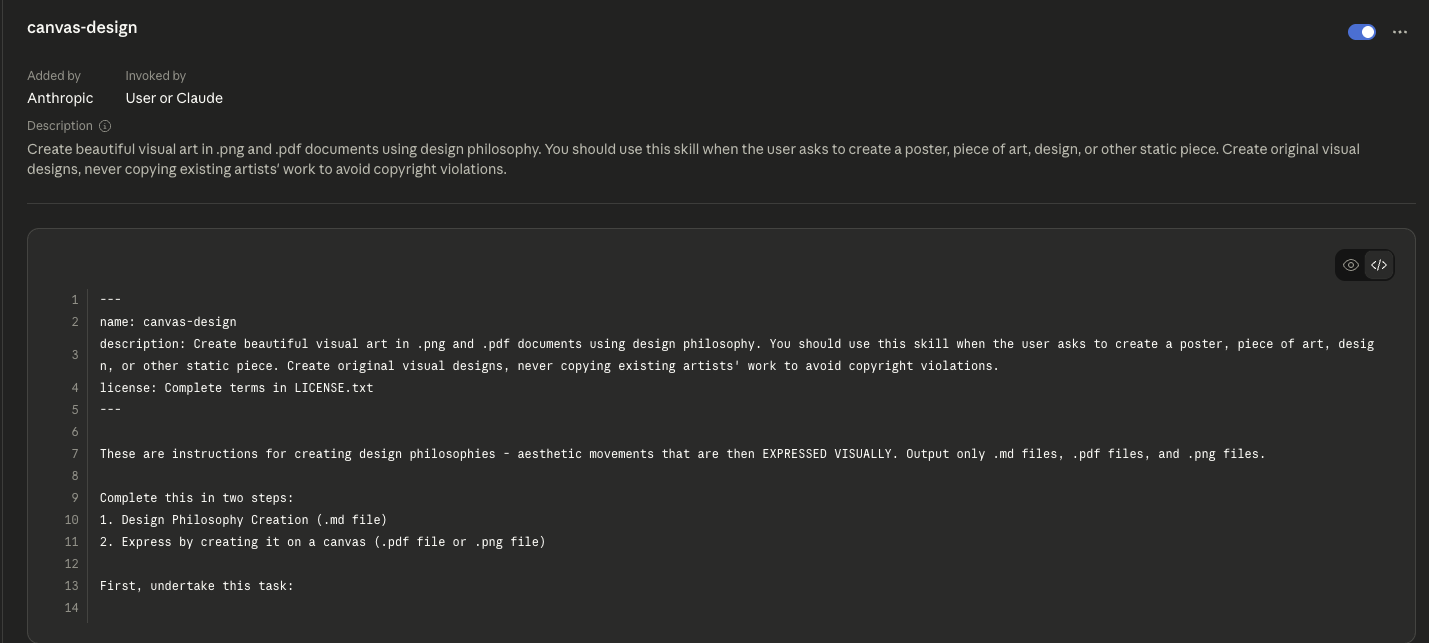
Each Skill includes:
- YAML frontmatter with a name and short description (this is how Claude decides when to load it)
- Markdown instructions covering inputs, framework, output format, and guardrails
- Optional scripts and references for more complex workflows
Anthropic launched Skills in October 2025 and published them as an open standard in December 2025.
Since then, organisation-wide deployment has shipped, meaning admins can provision Skills for every user on their team.
Here’s the bit that makes this practical: Claude only loads a Skill when it’s relevant to what you’re asking.
The frontmatter sits in Claude’s system prompt.
The full instructions load only when triggered.
So you can have 10 Skills installed and Claude won’t burn context on the nine you don’t need right now.
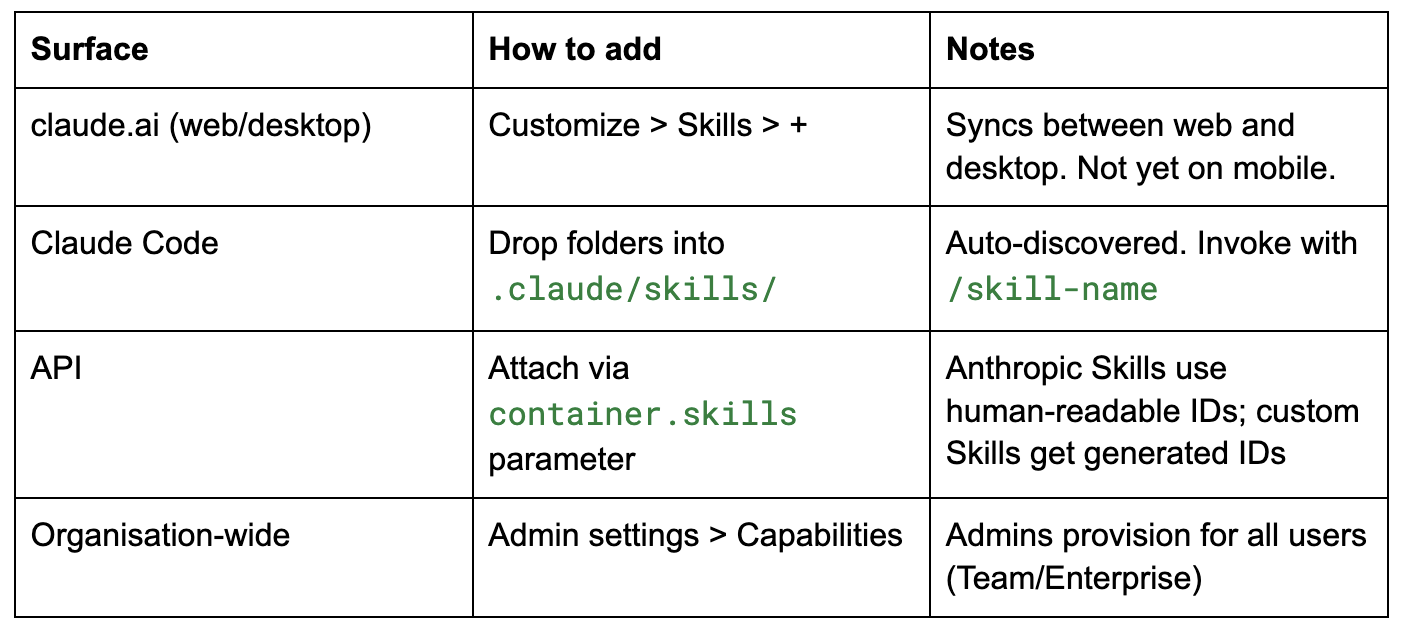
They work across Claude.ai, Claude Code, the API, and Cowork (Anthropic’s desktop agent for non-developers).
Cowork connects to Google Drive, Gmail, and other tools via MCP, and with Dispatch you can trigger Skills from your phone while your desktop agent does the work. Build once, use wherever you work.
Where Skills live
The Customize > Skills page in claude.ai.
Each Skill shows its name, description, and when it was last updated. The right panel previews the SKILL.md contents.
One-off prompts are a treadmill
Here’s what most marketers call “using AI”:
open a tab, write a prompt, get output, close the tab, forget the prompt existed.
Repeat again and again with slightly different wording. We’ve collectively decided this is productivity.
The bigger cost is process knowledge rotting in your head. Every time you switch contexts, take leave, or hand off a project, the method disappears with you.
According to a Pragmatic Institute survey, only 28% of product professionals say they spend meaningful time on strategy. The rest goes to tactics, execution, and rework. A UXcam analysis from 2024 puts it more bluntly: PMs spend 52% of their week on unplanned, reactive work. Fire-fighting.
For PMMs specifically, the pattern is painfully familiar:
- Every launch feels like a reset.
- New teammates ask for templates that don’t exist.
- Sales assets land late because you’re formatting battlecards instead of sharpening the message.
- Positioning doc A contradicts version B.
Productise yourself
Here’s a useful test for whether your process actually works: what happens when you’re not in the room?
(Which, incidentally, is also a good test for your team structure. But that’s a different article.)
When a Skill captures your method, your process runs without you. A colleague feeds it the right inputs, gets an 80% complete doc, spends 30 minutes on edits, ships it to sales that afternoon. No need to wait for you to come back from PTO.
You review. You refine. You focus on the 20% that actually requires judgment. Strategy. Message. Positioning. The work that compounds.
Clone the repeatable parts. Spend your time on the work only you can do.
Five Skills worth building
Here are 5 core skills to start with:
- competitive battlecard
- messaging framework
- launch plan
- content calendar
- sales follow-up
1) Competitive battlecard Skill
The job: Turn scattered competitor intel into a buyer-ready battlecard.
Inputs
- Competitor website URL or pasted text
- Pricing page (or screenshot)
- 3-5 customer reviews (G2 snippets work)
- Your ICP (one paragraph)
Outputs
- One-page battlecard: ICP fit, strengths, weaknesses, traps, landmines
- “How we win vs X” narrative (3-4 sentences)
- Sales talk track
Time saved per run: 2-3 hours per competitor.
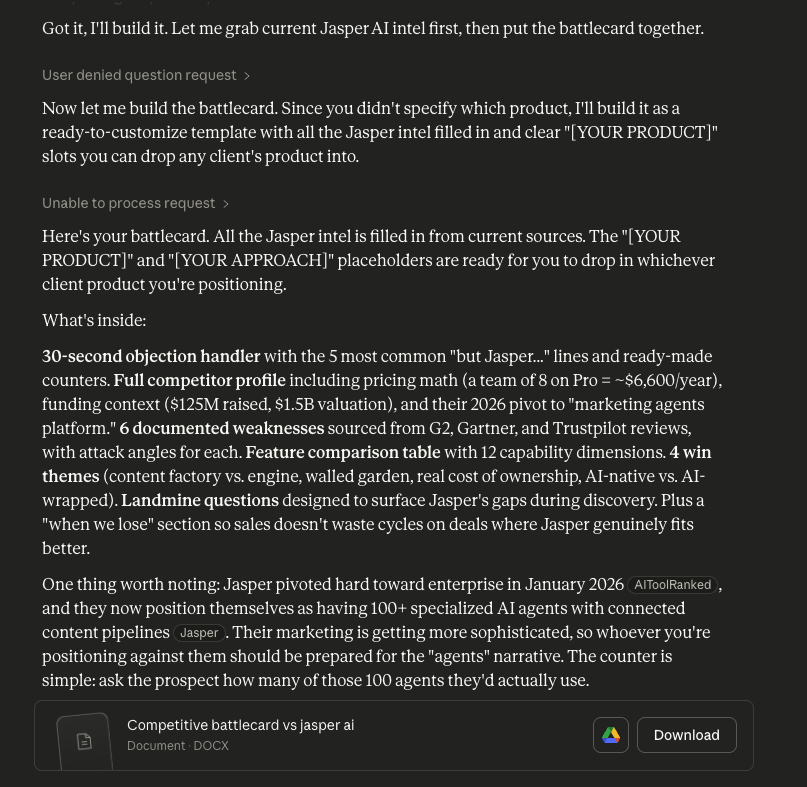
A competitive battlecard request triggers the Skill. Notice the thinking indicators: “Identified ambiguity regarding which product needed competitive analysis,” then “Searching the web” and “Read docx skill for best practices.” The Skill asks clarifying questions before generating.
name: competitive-battlecard
description: Build a buyer-ready competitive battlecard from competitor intel. Use when the user mentions competitor analysis, battlecard, competitive positioning, or “how we win against X.”
---
# Competitive Battlecard Skill
## Inputs to gather
Ask the user for:
1. Competitor name and website URL or pasted content
2. Pricing page or screenshot
3. 3-5 customer reviews (G2 snippets work)
4. One-paragraph ICP description
## Framework
Apply this structure:
- ICP fit analysis
- Strengths (with evidence from reviews)
- Weaknesses (with evidence)
- Traps (misleading claims to watch for)
- Landmines (questions that expose their gaps)
## Output format
One-page markdown battlecard. Add a 3-sentence “how we win” narrative at the end.
Include a sales talk track section with 3-4 key lines.
## Guardrails
- Use only the sources provided. Do not fabricate claims.
- Label any assumption as “[ASSUMPTION. Verify before using.]”.
- Flag if pricing data looks outdated.
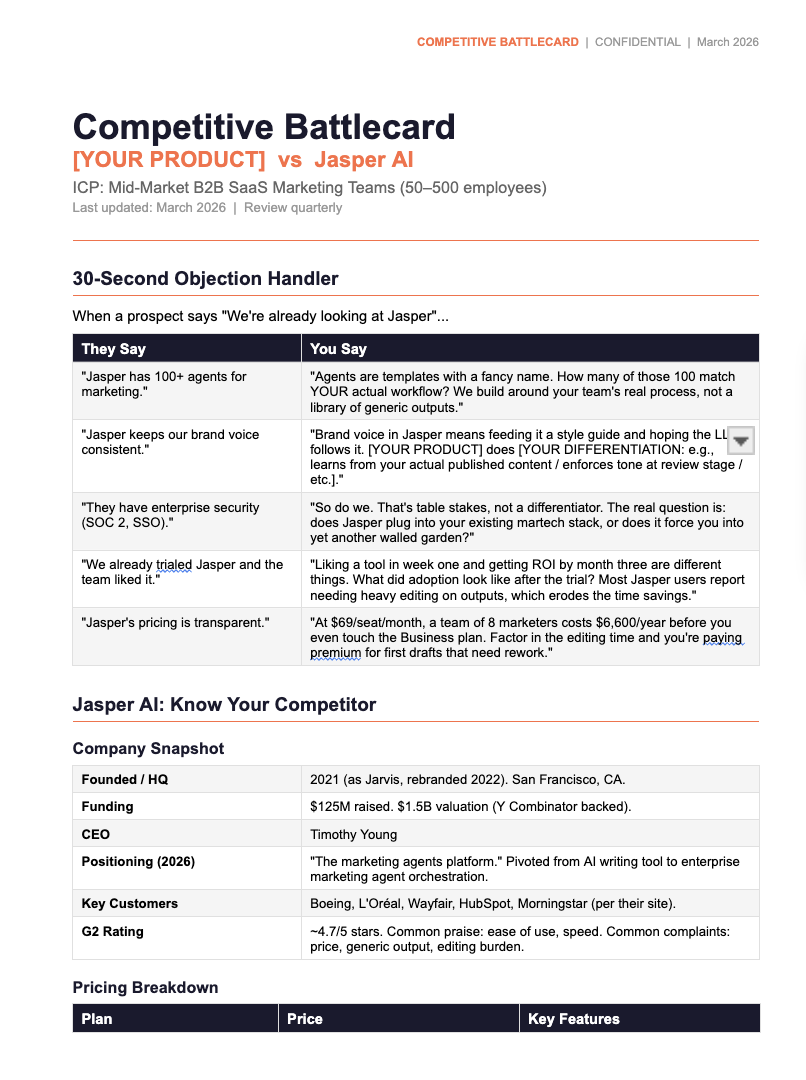
The finished output: a 5-page competitive battlecard DOCX with 30-second objection handler, company snapshot, pricing breakdown, and “[YOUR PRODUCT]” placeholders ready to fill. One prompt. One Skill. Built in minutes instead of hours.
Trap to avoid: Never trust the Skill’s pricing data without checking the source. Competitors update pricing pages constantly.
2) Messaging framework Skill
The job: Turn product inputs and customer quotes into positioning, pitch, and objection handling.
Inputs
- ICP
- Product capabilities (bullets)
- 3-5 customer quotes or testimonials
- Top 3 objections from sales
Outputs
- Positioning statement (one sentence)
- 30-second pitch
- Value pillars (3-4)
- Objection rebuttals (tied to pillars)
- Short narrative for a sales deck
Time saved per run: Two weeks of back-and-forth becomes two hours of iteration.
name: messaging-framework
description: Build a positioning and messaging framework from product inputs and customer evidence. Use when the user mentions positioning, messaging, value proposition, pitch, objection handling, or “how do we talk about this.”
---
# Messaging Framework Skill
## Inputs to gather
Ask the user for:
1. ICP description (who you’re talking to)
2. Product capabilities (bullet list or feature doc)
3. 3-5 real customer quotes or testimonials
4. Top 3 objections the sales team hears most
## Framework
Build in this order:
1. Positioning statement: [For ICP] who [situation], [product] is [category] that [key benefit]. Unlike [alternatives], we [differentiator].
2. 30-second elevator pitch (conversational, not corporate)
3. Value pillars: 3-4 core themes. Each pillar needs a customer proof point.
4. Objection rebuttals: map each objection to the pillar that answers it.
5. Sales deck narrative: 4-5 sentence story arc for the pitch.
## Output format
Structured markdown doc with clear section headers.
Positioning statement goes first.
Each value pillar gets its own section with: claim, evidence, and the customer quote that supports it.
## Guardrails
- Every claim must trace back to a provided input. No invented benefits.
- If a pillar has no customer evidence, flag it: “[NEEDS PROOF POINT]”.
- Positioning statement must be one sentence. If it needs two, it’s not clear enough.
- Do not use superlatives (”best,” “only,” “first”) unless the user provides proof.
The framework lives in the Skill, not in your head.
New joiners sound on-message right away. Consistency doesn’t depend on you being in the room.
3) Launch plan Skill
The job: Turn messy inputs into a GTM plan you can paste into Notion or Asana.
Inputs
- Launch tier (1, 2, or 3)
- Goals and constraints
- Target audiences
- Raw feature notes or PRD excerpt
Outputs
- Launch plan: objectives, audiences, key messages, channels, milestones, owners, risks
- Channel checklists: email, in-app, sales enablement, social, partners
Time saved per run: 3-5 hours per launch.
name: launch-plan-builder
description: Turn messy launch inputs into a structured GTM plan. Use when the user mentions launch planning, GTM plan, go-to-market, or has raw feature notes they want turned into a launch brief.
---
# Launch Plan Builder
## Before generating, ask:
1. What launch tier is this? (1 = major, 2 = mid, 3 = minor)
2. What’s the timeline? Any hard deadlines?
3. Budget constraints?
4. Known blockers or dependencies?
## Inputs to gather
- Launch tier
- Goals and constraints
- Target audiences
- Raw feature notes or PRD excerpt
## Output format
Markdown launch plan with these sections:
- Objectives
- Target audiences
- Key messages (per audience)
- Channels and tactics
- Milestones and timeline
- Owners (leave as [OWNER TBD] if unknown)
- Risks and mitigation
Add channel checklists as sub-sections: email, in-app, sales enablement, social, partners.
## Guardrails
- Do not invent metrics or benchmarks. Use “[ADD BENCHMARK]” placeholders.
- Flag any missing input that would change the plan shape.
Trap to avoid: Don’t skip the clarifying questions step. Garbage inputs produce garbage plans.
You just got two complete Skills. Install them, test them on a real project, and see if the output holds up.
Want to go deeper? At We Call Shotgun, we help startups and scale-ups integrate AI into their product and GTM processes. Explore our AI adoption programs for hands-on workshops and deployment support.